
Searching for Academic Literature Can Sometimes Be a Challenge
Searching for academic literature can sometimes be a challenge. You’re looking around online, wandering what’s relevant and what’s not, hours go by and you’re getting increasingly frustrated. Don’t worry, you’ll be able to do an initial literature search that will take less than 5 minutes!
Three Top Tips
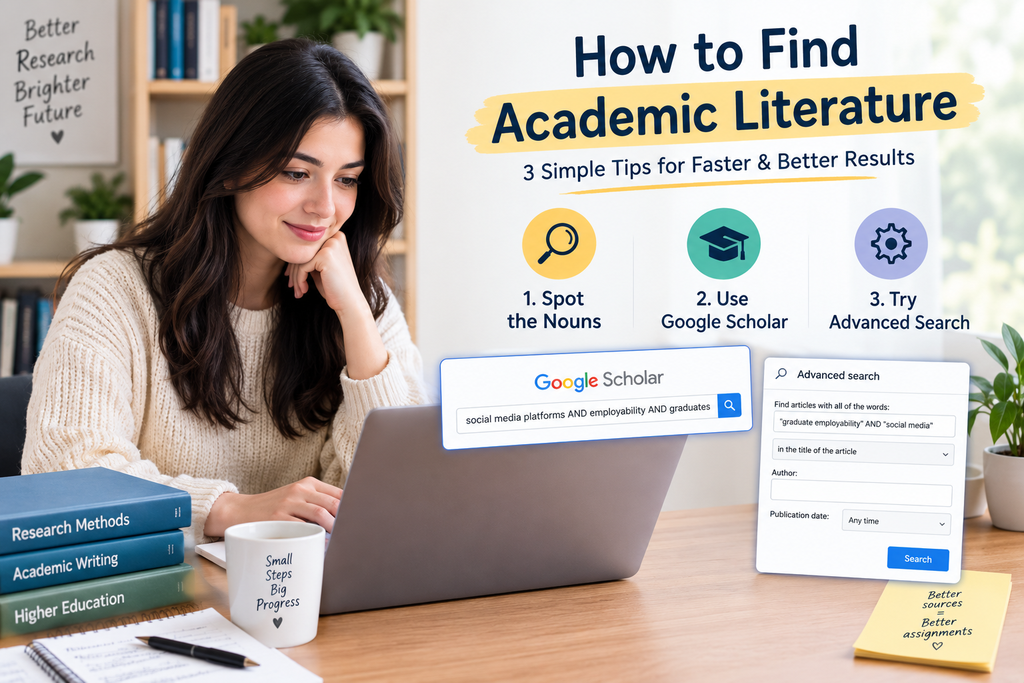
I’m going to share with you three top tips for finding valid, relevant items to use in your essays, presentations, dissertations and other assignments: noun spotting, not just Googling it, and Advanced Search. There are three tips we’ll be learning about: spot the nouns, don’t just Google it and use Advanced Search.
Spot the Nouns
Without wasting any time, we will jump right into tip one – identify the nouns. Just take a quick glance at the question or title of your project/dissertation and select the nouns – words which name people, places, and things.
The Nouns in This Assignment Title
For example, let’s take a look at this assignment title: Critically consider the role of social media platforms in boosting employability among graduates. The nouns in this assignment title are social media platforms, employability and graduates. You can use these words as search terms and the best way to search for literature is Google Scholar, which we’ll take a look at now in tip number two.
Don’t Just Google It, Google Scholar It
Don’t just Google it. Tip number two – Don’t just Google it, Google Scholar it. Use Google Scholar when searching for literature, rather than general Google. Google Scholar is more likely to return books, papers and articles that are written by academics rather than random people on the internet!
The Academic Version of Quality Control
The things you’ll find when you search Google Scholar are also highly likely to have been peer reviewed. This basically means that other academics have scrutinised these pieces of work to make sure they’re accurate and useful, and made suggestions as to how they can be improved before they’re published. It’s like the academic version of quality control.
Anyone Can Put Anything Up on the Internet
If it’s been peer reviewed, it’s considered scholarly and academically valid. If it hasn’t, it isn’t quite so solid. The stuff you find through a general Google search is much less likely to have been peer reviewed, so for the most part, avoid it! Anyone can put anything up on the internet, especially on sites like Wikipedia!
That Dreaded Feedback
If you stick to sources from Google Scholar, you’re much less likely to receive that dreaded feedback: “Your sources were not academically valid.” Let’s take a look at how you can search for those nouns from our example assignment in Google Scholar.
All Three of Our Search Terms
Now, let’s see if we can find anything pieces of academic literature that have all of these three of our search terms in them. Wouldn’t it be great if there was a book, a journal article or a report that has all three of these in it, because that would be super relevant for our assignment? Let’s try that now.
How Do You Narrow This Down?
In the search bar type in social media platforms AND employability AND graduates. What comes back? A LOT of results! How do you narrow this down? Advanced search which, you guessed it, I’m covering in the next tip.
Supercharge Your Google Scholar Search with Advanced Search
Supercharge your Google Scholar search with Advanced Search. When you have your big long list of search results on the screen, go to the three lines or the burger as some people call it in the top left of the screen and select Advanced search from the menu. This little box will pop up.
In the Title of the Article
The first thing you should try is going to where my words occur and selecting in the title of the article. This will return items that mention all of your search terms in the title. Let’s give that a go. Nothing comes back, we’ve been too specific here so we need to be more broad.
Play Around with the Words a Little
But, we still want to use this in the title of the article button, we’re not ready to give up on it yet. What we can do here is start to play around with the words a little. What other exact search terms might we be able to use, which essentially mean the same thing?
Graduate Employability
Okay, we’ve currently got employability and graduates as separate words. Why don’t we try to combine them into graduate employability and give that a go? What we might also want to do is get rid of platforms off the end of social media platforms because not everybody says platforms on the end anymore, do they, they just say social media.
A Much Smaller Number of Results
What happens when we type this into the box instead, like this – “graduate employability” AND “social media”. We’re going to keep the radio button in the title of the article selected and just see what comes back. Okay, so we have a much smaller number of results here and they all look relevant for our assignment, don’t they, so we’re off to a really good start here.
Really Specific Really Quickly
We can download these, read them, makes some notes and begin to use them to help develop our assignment. We’ve gone from tens of thousands of results down to less than 10 so Advanced Search is a great way of getting really specific really quickly in our literature searches.
Particular Authors
Have a play around with Advanced Search and the other things you’re able to select. You can specify particular authors and that’s something you might want to do next, because the same author name – K Sutherland – has come up a few times in our search results, they might have written other articles or books that focus on this topic and we would certainly want to check those out.
A Range of Publication Dates
You can search by a range of publication dates too to narrow it down further and by the place the piece of literature was published.
Sufficiently Critical and Analytical
Give Advanced Search a go, because the less time you spend trawling Google Scholar for literature, the more time you can spend writing your assignments and ensuring that they’re sufficiently critical and analytical.
My Three Top Tips
And that’s it! Those are my three top tips for boosting your literature searches: spot the nouns to use as search terms, use Google Scholar, and use Advanced Search.
